 Petapator.
Using Petapator — a guide for individual users
Petapator searches the patent literature and drafts six (6) complete patent applications from your invention disclosure. This guide is for using it on the hosted service — you signed up yourself, you pay as you go, and there is nobody to ask.
Everything happens in a browser. Nothing to install.
Petapator gets you to a strong draft fast. It is not the end of the process: you take the drafts to your patent lawyer, who reviews them, refines the claims, and completes and files the applications. Petapator removes the blank-page stage and the first prior-art search — most of the work — and leaves the professional judgement where it belongs.
The home page
When you first arrive at the site, you land on a public page with the sign-in card at the top and, below it, a short explanation of what Petapator does, the cost, screenshots, the how-to videos, links to this guide, and a way to ask for a trial by emailing info@makebell.com. You do not need an account to read any of it.
There is also a Help page at /help that collects all of this in one place — this guide, the videos, and a downloadable sample output — and it stays reachable after you sign in (Help is in the app's top bar and in the footer of every page). Your web browser plays an MP4, so any device can watch them.
At the bottom of every page — here and inside the app after you sign in — is a footer linking Help, the User guide, the Terms of Use, the Privacy notice and the Disclaimer. Worth a skim before you upload anything: they say plainly that Petapator is not a patent attorney, that your invention disclosure is processed by a third-party model, and what happens to your money.
What you get, and what it costs
You describe your invention. Petapator searches the patent literature, asks you a few questions, then produces:
- A prior-art report — what already exists and how close it is
- Three specifications — three different ways to frame what is novel
- Six claim sets — a broad and a narrower set for each theme
- Figure sets — drawings for each theme: flow charts of the process, and
apparatus pictures where the service draws them
- Three white papers — marketing-style writeups
- An independent feasibility review of each draft
Total: USD 267 per project, paid in three parts as the work progresses:
| When | Amount | What it unlocks |
|---|---|---|
| When the run reaches Step 4 | USD 19 | The prior-art analysis and the prior-art report |
| After you have seen the search | USD 149 | The full drafts — specifications and claims |
| After you have read the drafts | USD 99 | The white papers and the final bundle |
You top up a wallet and the milestones are deducted from it. There is no subscription and no per-run charge.
You can look before you pay the big part
After the first USD 19, you get the complete prior-art report. After the USD 149, the specifications and claims are yours to read in full — but until the final USD 99 they show as a preview only: the first 300 words and the last 300 words.
That preview is deliberately enough to judge whether the draft is any good. If it is not, stop. You have paid USD 168, not USD 267.
Signing in
Two factors, always. There is no password. Nothing to remember and nothing for anyone to steal. Instead, the second factor is an authenticator app on your phone.
Your first time — you arrive from an invitation:
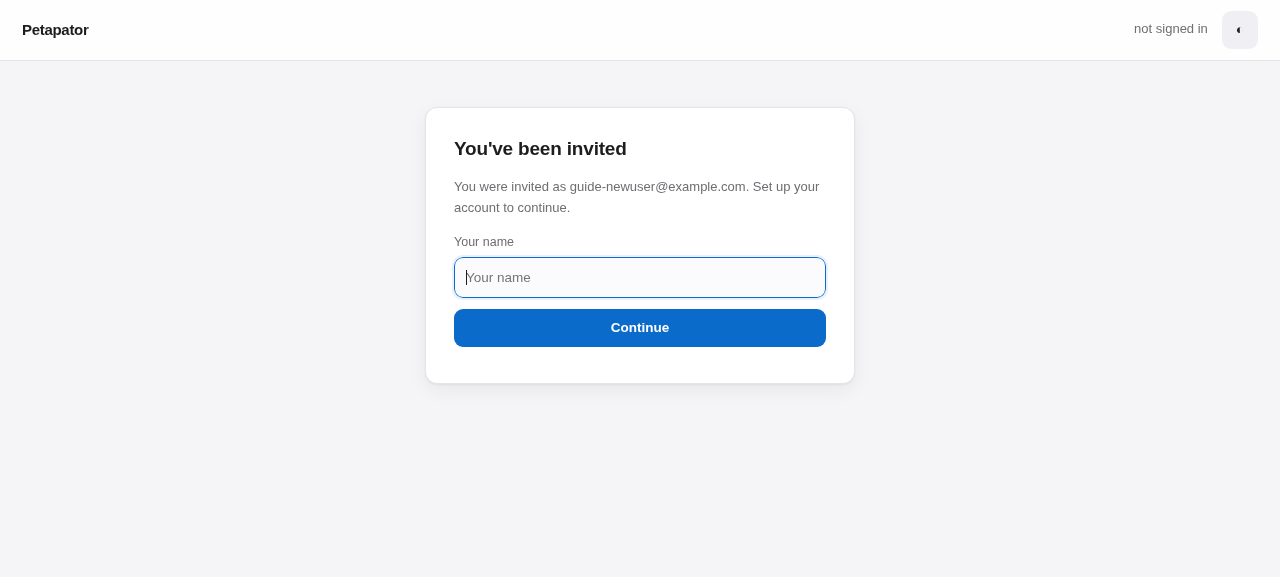
1. The invitation card asks for your name. Enter it and continue.
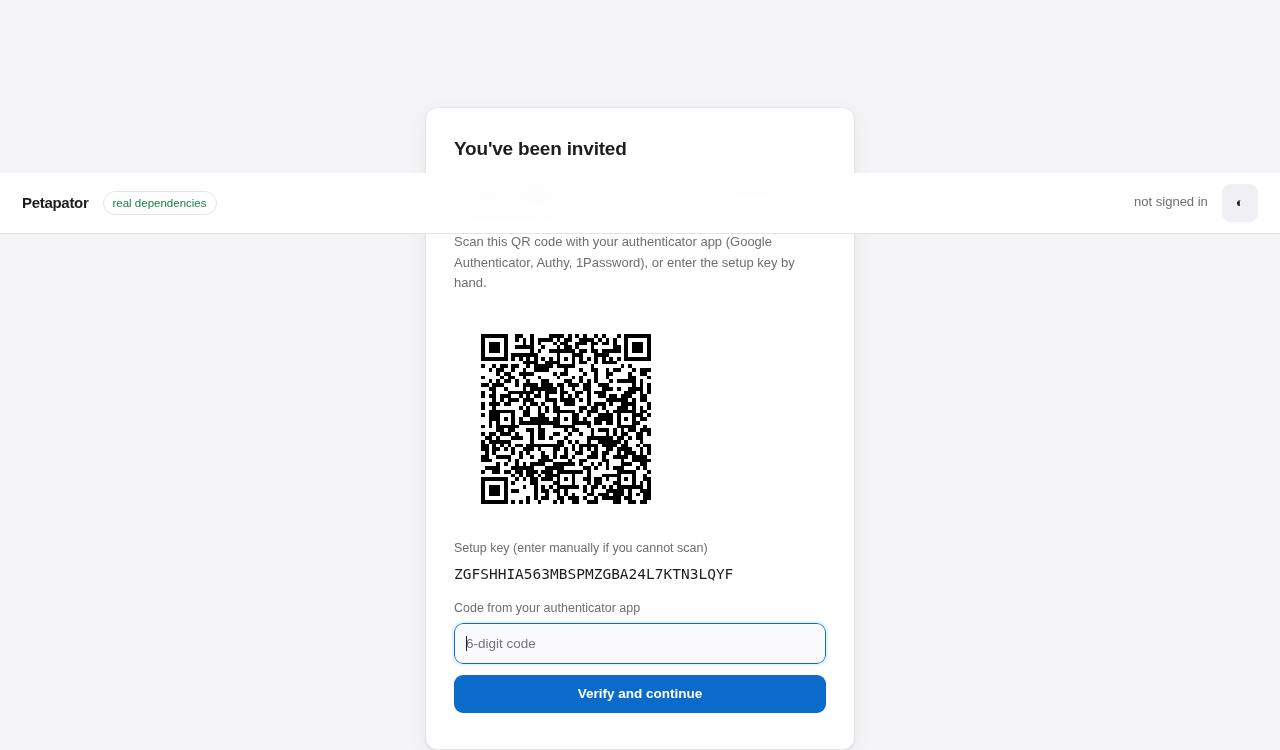
2. Petapator shows a QR code. Open an authenticator app — Google Authenticator, Authy, 1Password, Microsoft Authenticator, anything similar — choose its scan QR code option, and point the camera at the code on screen. The app adds Petapator and starts showing a fresh six-digit number every thirty seconds. If you cannot scan, type the setup key shown under the code instead. Then type the number the app is showing and continue.
3. You are given ten backup codes. Save them somewhere other than the phone that holds your authenticator — each works once, and they are the way back in if that phone is lost. There is no self-service way to mint a fresh set: if you run out, ask the person who invited you (or an admin) to reset your second factor.
Every time after that — signing in:
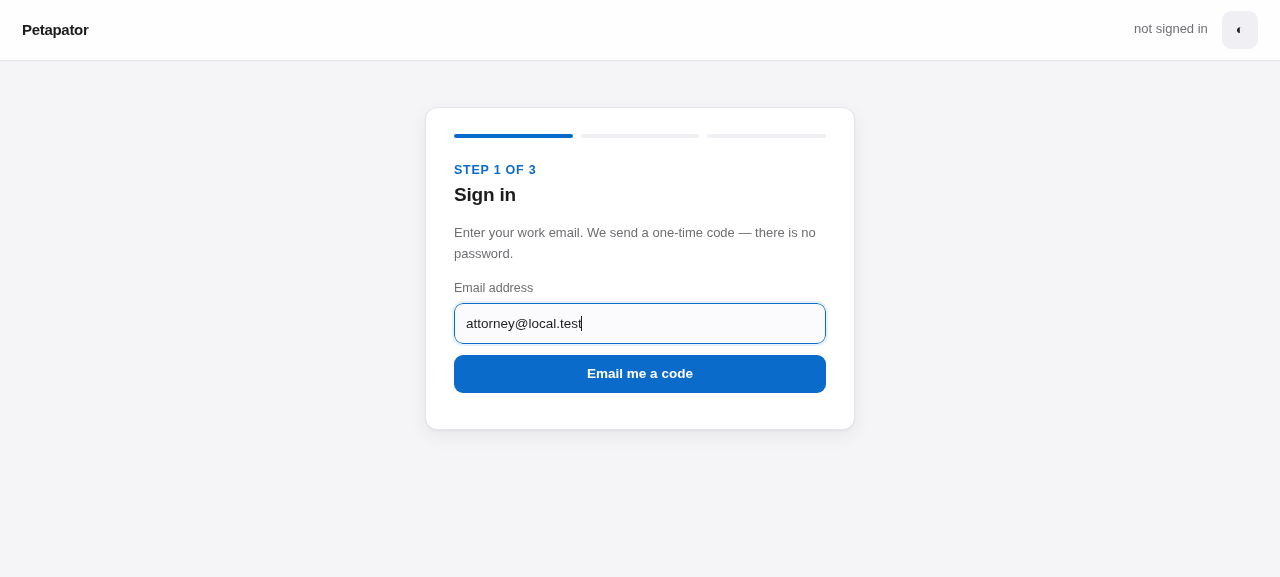
1. Enter your email address, choose Email me a code.
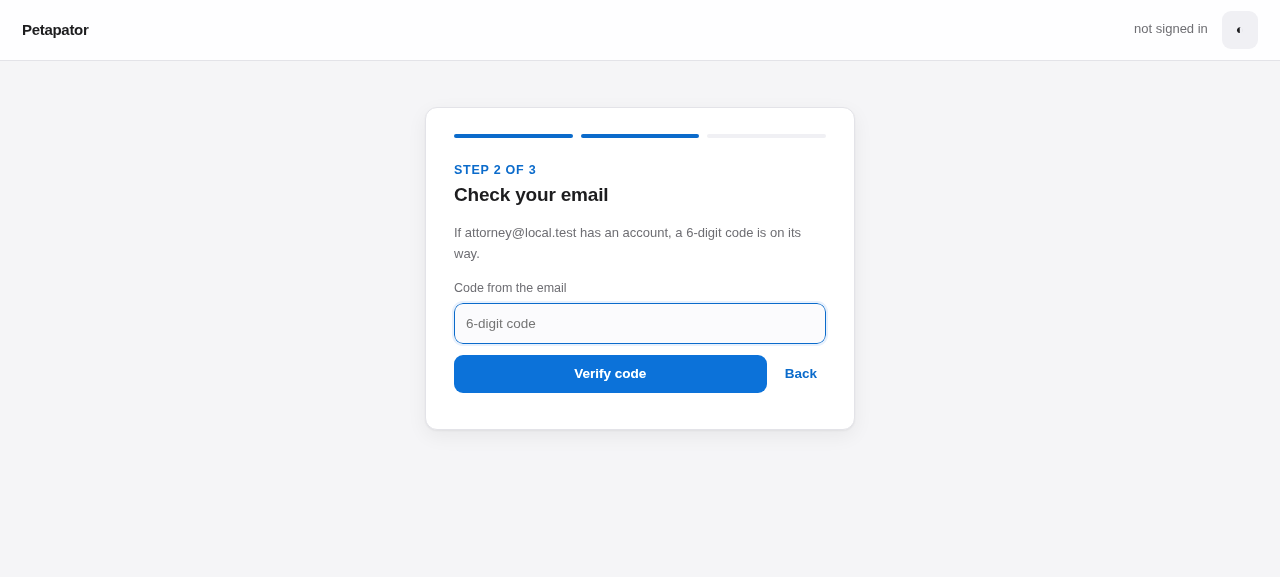
2. Enter the six-digit code from the email.
3. Enter the six-digit code from your authenticator app — or, if you have lost the phone, one of your backup codes.
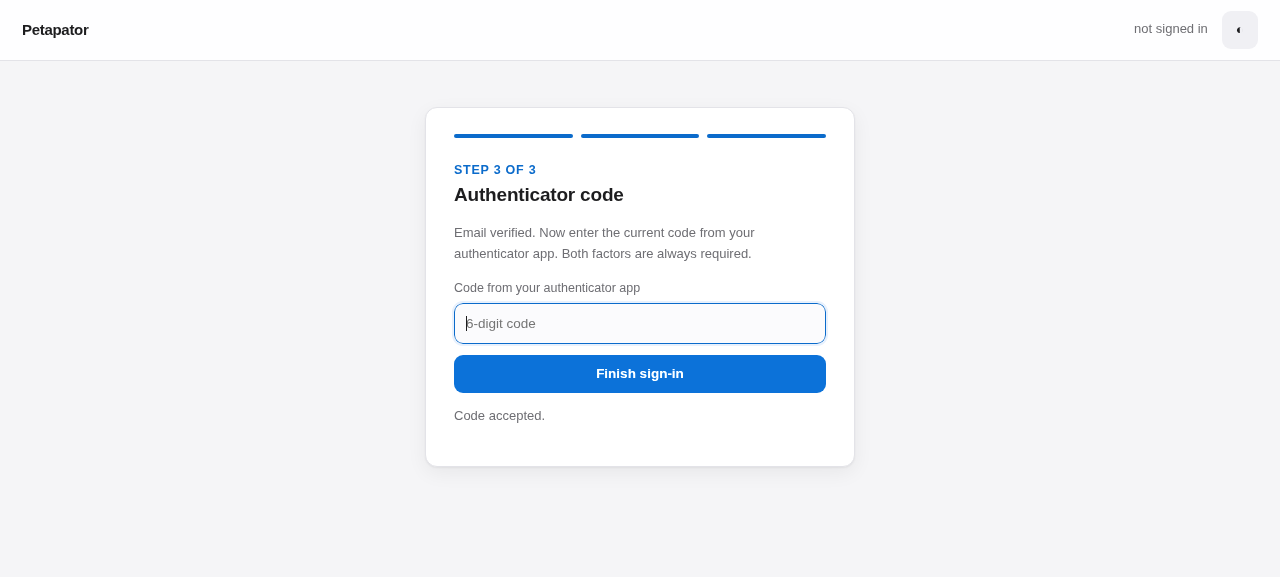
The email code lasts 10 minutes. If your authenticator codes are rejected, check your phone's clock — they depend on it being accurate. If you have lost the phone and have no backup code, use the reset link the person who invited you can send (see When something goes wrong).
Your first project
A project is one invention.
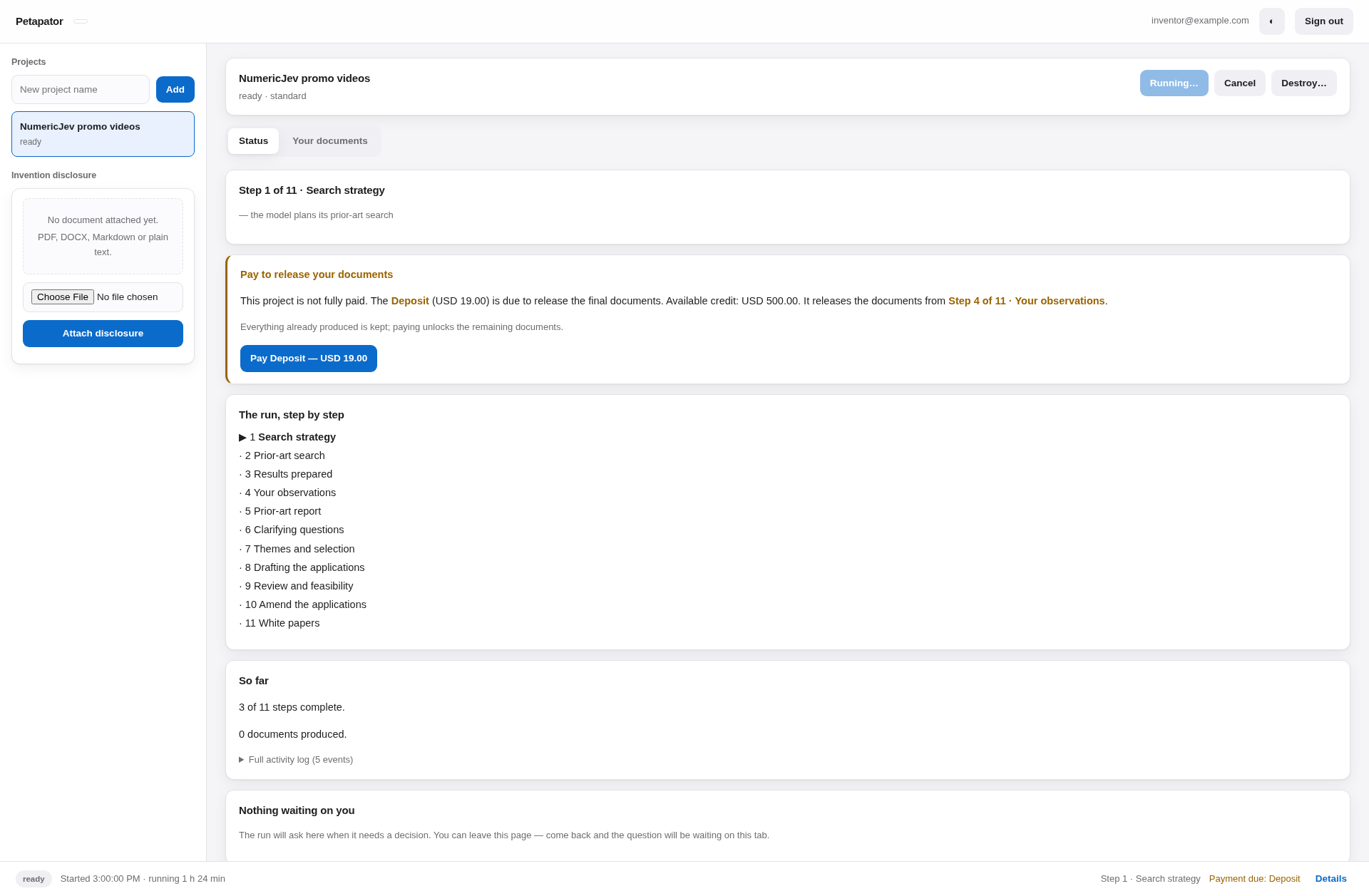
1. Create a project with a name you will recognise later. 2. Upload your invention disclosure. A PDF, a Word .docx, or plain text (.txt / .md). Attach your document as it is — there is nothing to convert. Pictures and diagrams in it are read for you, and the file is checked as you upload it, so an unreadable file is refused straight away rather than failing later.
Writing a disclosure that works
This is the single thing that determines whether you get something useful. The search is built from what you write; the model cannot look for what you did not mention.
Include:
- What the invention is, in plain language. Assume the reader has not seen
your field.
- The problem it solves. This matters more than the mechanism — the search
is framed around the problem.
- How it works. The parts, and what each does.
- Numbers, if you have them. Ranges, dimensions, tolerances, frequencies.
- What you tried that did not work, and why. Rejected approaches often
become useful fallback claims.
Leave out:
- Your life story and the company history.
- Anything you would not want in a document you might have to produce later.
How long: a few hundred words minimum. Around 500–1,500 words is the sweet spot. Under 200 words the search will be poor; over 5,000 and the model starts missing the thread.
Confidentiality — know where your text goes
Petapator sends your invention disclosure to a language model to do its work. On this service the model is hosted, so your invention disclosure leaves your machine and goes to the operator's model provider.
That is fine for most uses. It is not fine if:
- You are under an NDA that forbids it. Read the NDA.
- You are describing something already covered by an existing unpublished
application and confidentiality genuinely matters.
- A third party owns the invention and has not agreed.
Do not upload other people's confidential material without permission. If you need drafting where nothing leaves your control, that is the on-premise product, not this service — a law firm's IT department runs it entirely inside the firm's own network.
Also: do not upload anything you would not want read by a support engineer. Operators can see that a job exists and what it cost; they do not need to read your invention disclosure, and content access is logged.
Running it
Choose the project and press Start the invention disclosure process.
A complete run takes 20 minutes to a few hours depending on how busy the service is — a measured complete run took 17 minutes 38 seconds. You can close the browser. The run happens on the server, not in your browser, and it continues without you. Come back whenever.
It will stop and ask you things
This is normal and it is where your input is worth the most. The Waiting for you panel appears with a question and a box to answer in.
Stop 1 — after the search. It shows you the prior art it found and asks what you make of it. Tell it:
- Which references are the dangerous ones.
- What makes your invention different from the closest one — in your words.
- Anything you know that is not in your disclosure.
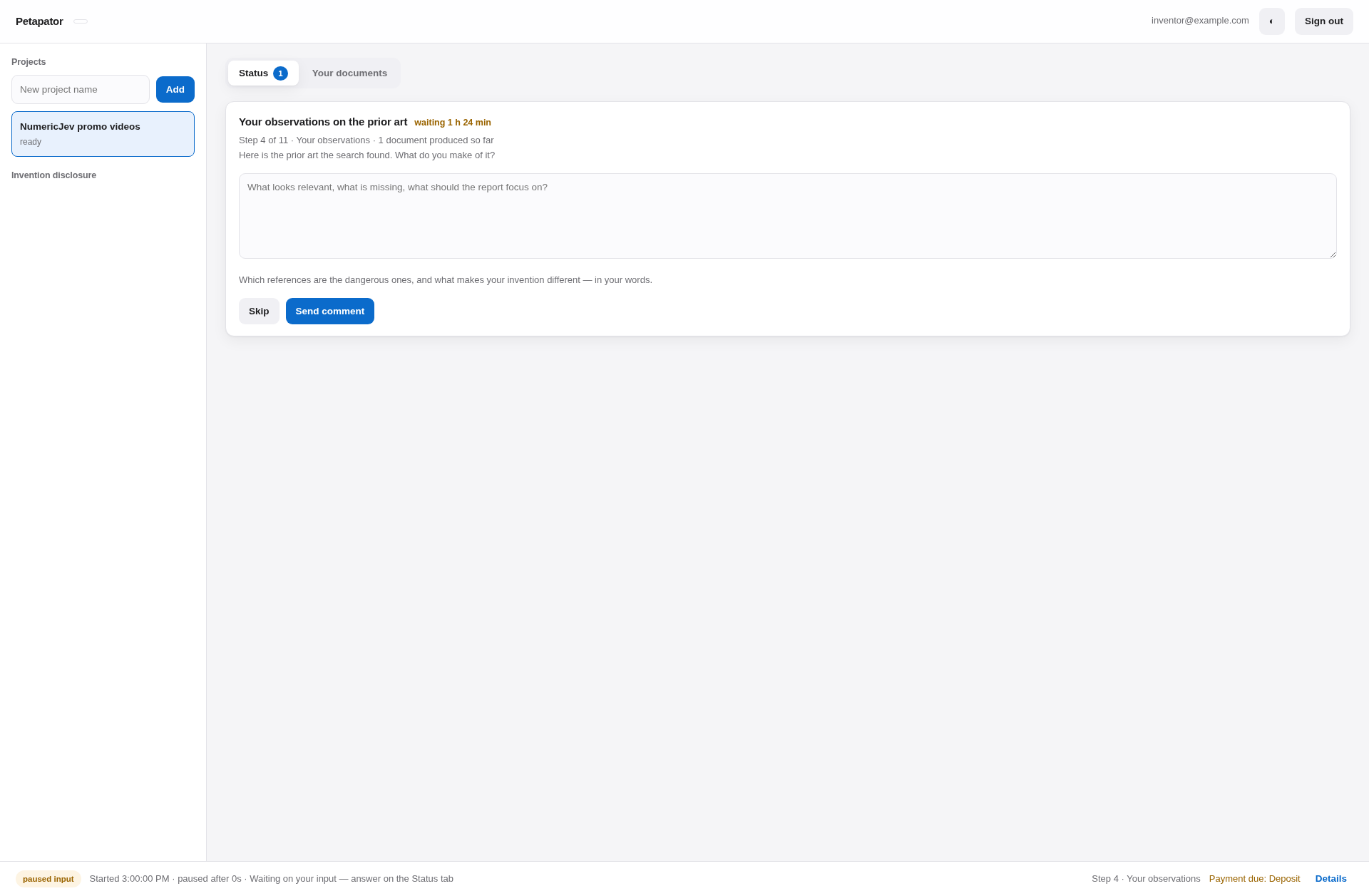
This is the highest-value thing you can do. A thoughtful answer here visibly improves the draft. If you have nothing to add, say so briefly and continue.
Stop 2 — the clarifying questions. Practical questions about your invention: what parts you used, what the failure modes are, what the numbers are. Answer what you know.
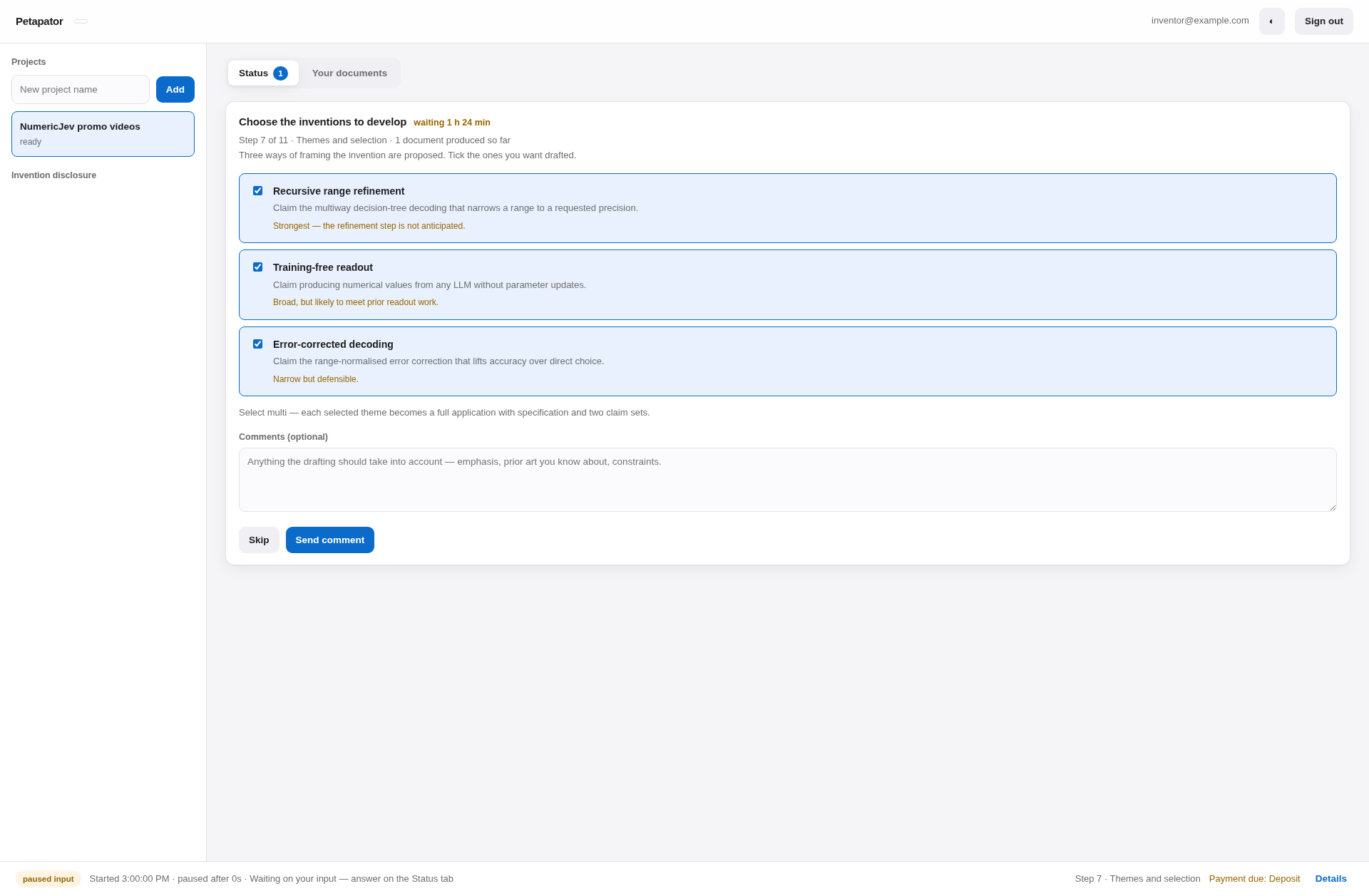
Stop 3 — choose themes. Three ways of framing the invention are proposed. Tick the ones you want drafted. Tick all three unless you are watching costs.
Stop 4 — feasibility. You confirm the review; the run then goes on to the amendment step and the white papers.
Stop 5 — amendments. Then you can ask for changes: type what you want different in each application and it is rewritten, or leave it blank to keep it.
You do not have to answer immediately. The run waits as long as you need — for free. Nothing is spent while it waits.
Watching it run
The Status tab shows Progress by step. At the top it says what the run is doing right now — Working on step 8 of 11 · Drafting the applications — with the step's own description underneath and the totals 7 of 11 steps complete · 34 prior-art references · 12 documents. Then all eleven steps are listed, each with one line saying what it does and, under it, its own activity.
Each step carries its own activity log underneath it. Click a step to open it: when it started, every model call with its timing, and every document it produced. The step the run is on opens by itself; steps that have finished keep their logs, closed until you want them. Nothing is filtered out, so the same place answers "is it still working?" and "what exactly did it do?".
Reading what you got
The project page lists the outputs:
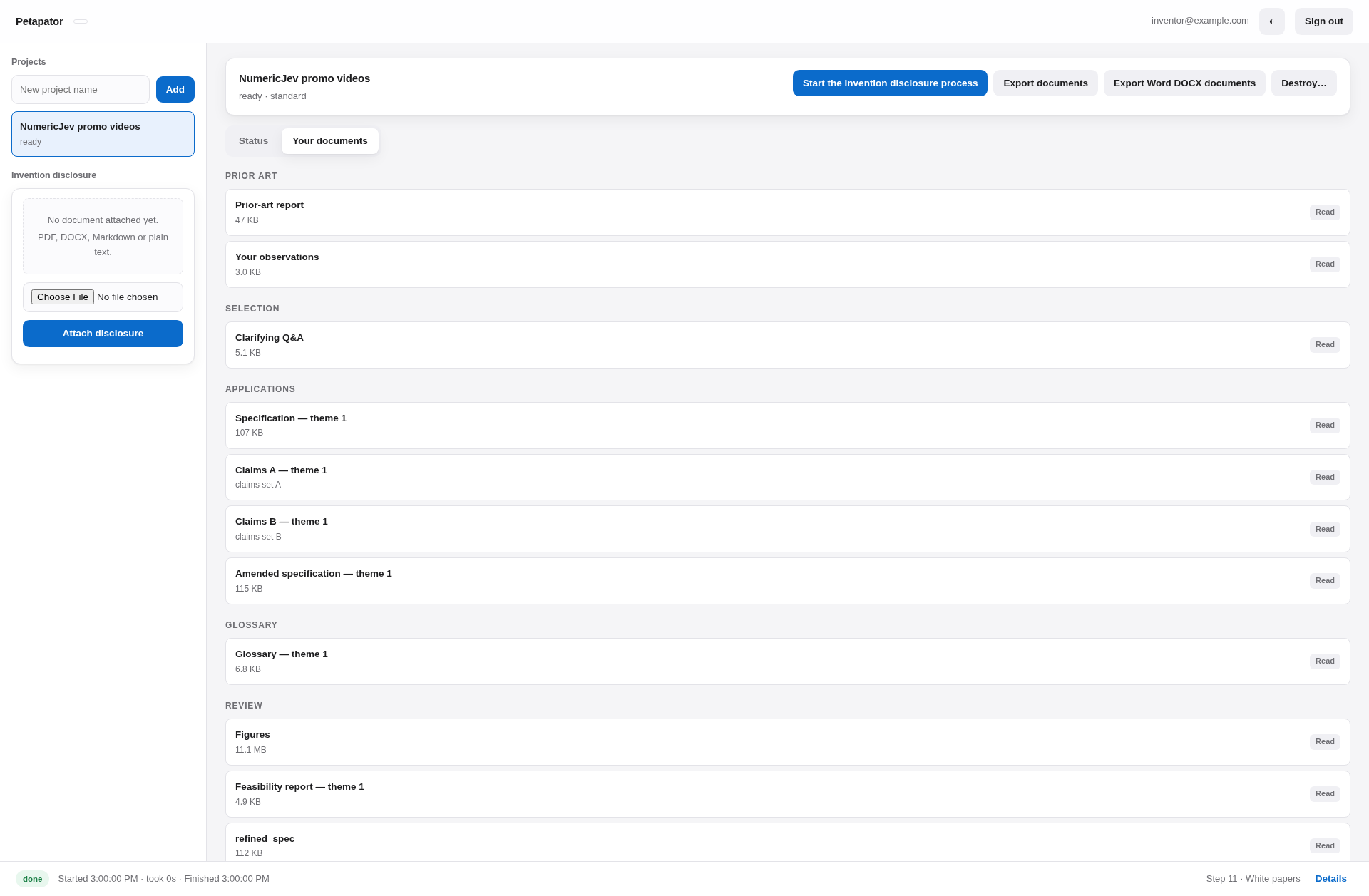
| File | What it is |
|---|---|
05_report.md | The prior-art report — read this first |
07_spec_N.md | Specification for theme N |
07_claims_N_A.md | Broad claims, theme N |
07_claims_N_B.md | Narrower fallback claims, theme N |
07_glossary_N.md | Terms used in theme N, with a labelled-elements table |
08_refined_N.md | Theme N revised after the review |
09_feasibility_N.json | An independent review of theme N |
10_amended_spec_N.md | Theme N specification as you amended it |
10_amended_claims_N.md | Theme N claims as you amended them |
11_whitepaper_N.md | Marketing write-up (after final payment) |
You also get 04_observations.md, which records what you said at the first stop, and 06_clarifying_qa.md, the transcript of the questions you answered. Both are worth keeping if you later wonder why the draft went the way it did.
A run produces 22 documents if you tick two themes and 30 if you tick three (6 project-level documents plus 8 per theme) — most documents are produced per theme, so ticking fewer saves time and money without reducing quality. The amendment step can add two more per theme — an amended specification and amended claims — so a run reaches 26 or 36 when you amend every theme.
Use Preview to see the beginning and end of a long document without opening it all. Use Open to read it fully.
Read the feasibility report before the specification
It is a different model looking for problems with the draft. It tends to find the things you would spot on your third reading, and it is worth five minutes before you fall in love with a draft.
How long the run takes
Measured on a complete run: 17 minutes 38 seconds, across 24 model calls. The longest single call took 83 seconds. Plan on twenty minutes to a few hours depending on how busy the service is — and note that nothing is charged while the run waits for you, however long you take.
What this is not
It is not a patent attorney, and it is not legal advice.
The output is a draft. It is a strong starting point and a genuine time saver, but:
- Claims generated by a model are often too broad. A claim that is too broad
is rejected, or worse, granted and then invalidated. A professional needs to review claim scope.
- It does not know your commercial strategy, your competitor's portfolio, or
the examiner's likely objections.
- It cannot tell you whether to file or where.
It is also not a freedom-to-operate search. It tells you what prior art a machine found. It does not tell you whether you infringe anyone's rights. Those are different questions and the second one is the one that gets companies sued.
Use it to get to a strong draft quickly, then take that draft to a professional. That is what it is for, and it is where the value is.
Money
Your wallet shows your balance and every movement — top-ups, milestone charges, and anything refunded. The list is a full history and cannot be edited.
When a gate is due, the project page shows the next payment and what it unlocks. Paying it resumes the run automatically if it is waiting.
If your balance runs out mid-run, the job pauses. It does not fail and nothing is lost. Top up, pay the gate, and it continues from where it stopped — the header says Waiting for payment — step N while it waits, and does not offer a Start button (the run exists; it is parked, not missing).
Abandoning a project wastes money. If you stop after the drafts but before the final payment, you have paid USD 168 and have a preview and a report. That is a reasonable outcome — but check the preview before you pay the USD 149, so you are not paying for drafts you will not use.
Refunds are handled by support. A refund appears in the wallet history as a separate entry; the original charge is never edited away.
When something goes wrong
It has finished. "Progress by step" says all eleven steps are complete, and the header shows no Start button — a finished run is not something to start again. Read everything in Your documents.
It says "paused". The project header shows Waiting for your answer — step N · the step's name, and the Status tab carries a count badge. Open Status: the question is below the step list. Nothing is charged while it waits.
It stopped with an error. The header shows the step it stopped at, and the Status tab says what went wrong. Two buttons are offered:
- Retry — resumes from the step it stopped at and keeps everything before it.
This is the one to press first; the usual cause is the model service being briefly unavailable, and it does not re-charge for completed work.
- Restart from step N — re-runs that step and every later one, discarding
their output, including drafts you have already paid for. Use it only when the step's own output is the problem.
Neither repairs the cause: if the fault is in the software rather than temporary, pressing Retry again will stop in the same place, and support needs to fix it.
Nothing found in the search. Your disclosure was too short or too general. Add the problem it solves and how it works, then run it again.
The draft is weak. Feed it more. The biggest lever is the first question: tell it what the closest prior art is and what makes yours different. Generic input gives generic output.
I lost my phone. If you saved backup codes, use one to sign in. If you have none left, ask whoever invited you to the service to reset your two-factor authentication — they will want to be sure who you are first, so expect to prove it, and expect it to take a little time. That delay is the point. They send you a one-time reset link; opening it sets up a new authenticator and gives you fresh backup codes. It changes only your authenticator — your account, your projects and your wallet are untouched.
I want to delete a project. Choose Delete on the project. It destroys the disclosure and all the drafts. Your payment history is kept — chargebacks and account disputes need it — but the content is gone and cannot be recovered.
A worked example
> "I want to protect a new kind of reusable coffee filter."
1. Create a project, Reusable coffee filter v1. 2. Write 800 words. What it is. The problem — existing reusable filters clog and are fiddly to clean, so people go back to paper. How yours works — the mesh geometry, the silicone gasket, the fact that it inverts for cleaning. Numbers: pore size, flow rate. What you tried first: a flat mesh, which clogged worse. 3. Run it. Go and do something else. 4. The first question arrives. You already know the nearest product is a specific competitor's filter and that yours differs in the inverting action, not the mesh. Say exactly that. 5. Answer the practical questions. 6. Tick all three themes. 7. When it finishes, read 05_report.md, then 09_feasibility_1.json, then the specification. Pay the second gate only if the preview looks sound. 8. Take the draft to a patent professional. You have skipped the blank-page stage and the first search, which is most of the value.